

5-Channel Qualification Test
Quad Point Melt (QPM) Qualification Run:
The 5 Channel qualification is the latest qualification method, which provides more rigorous testing of the instrument and supersedes the previous CD4 qualification.
- Click on Maintenance tab and then the Environmental Variables tab. Check the following items and click Save:
- Allow FDA Analysis.
- Allow Incomplete Worklist.
- Export Assay Definition files (ADF) Data.
- Export Run PDF.
- Select Top or Bottom.
If running software version 5.0, ensure that DB defense is NOT enabled.

- Obtain the 5 Channel Qualification Kit, containing Unitized Reagent Strips (URS), Extraction Tubes, EBP Master Mix Tubes, Positive Control Tubes, QPM Master Mix Tubes, Sample Buffer Tubes, Septum Caps, and four 24 well micro fluidic cartridges.
- Record the kit and cartridge lot and expiration dates in Qualification Checklist.
- Put on PPE (i.e. gloves, safety goggles, lab coat, etc).
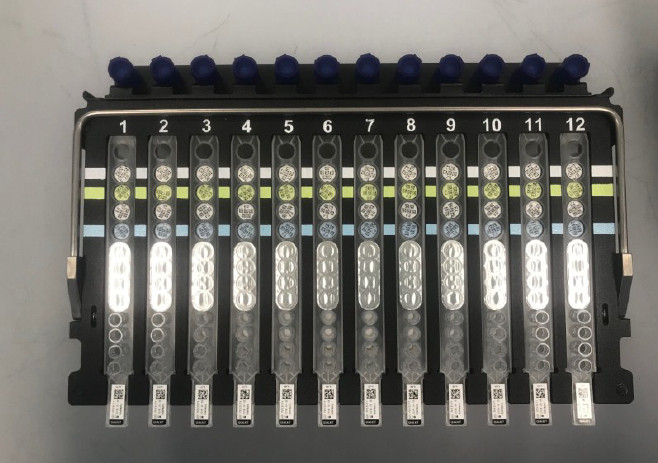
- Add 24 URS to two rack assemblies.
- Check the fluid levels in each strip and tap the strips against a surface, releasing any trapped air at the bottom of each tube.
- Check that tips are properly positioned.
- Add 24 Extraction Tubes labeled B2 to the white line position on the rack.
- Check that tubes are properly sealed and that the extraction cake is intact and in the right orientation (tapered end down).
- Snap the tubes into the racks.
- Add 24 EBP Master Mix Tubes labeled E9 from the green pouch to the green line position on the racks.
- Check that tubes are properly sealed.
- Snap the tubes into the racks.
- Add 24 Positive Control Tubes labeled E4 to the snap 3.
- Check that tubes are properly sealed.
- Snap the tubes into the racks.
- Add 24 QPM Master Mix Tubes labeled F3 from the blue pouch to the blue line position on the rack.
- Check that tubes are properly sealed.
- Snap the tubes into the racks
- Add 24 Sample Buffer Tubes to the racks.
- Check that there is fluid in the tubes.
- Add the blue pierceable Septum caps to the tops of the tubes.
This rack setup will be used for two runs on the MAX. Do not dispose of the URS or sample buffer tubes until Section 3.
- Load the latest ADFs files BD MAX QPM QUAL 63 and BD MAX 5CH QUAL 63 to the instrument.
- Record the ADF file names and versions in Remarks section of the Qualification Checklist.
- Click on Run , then Kit Inventory.
- Scan the consumable barcode to the Enter Kit Barcode line.
- Check Active. Then click Save.


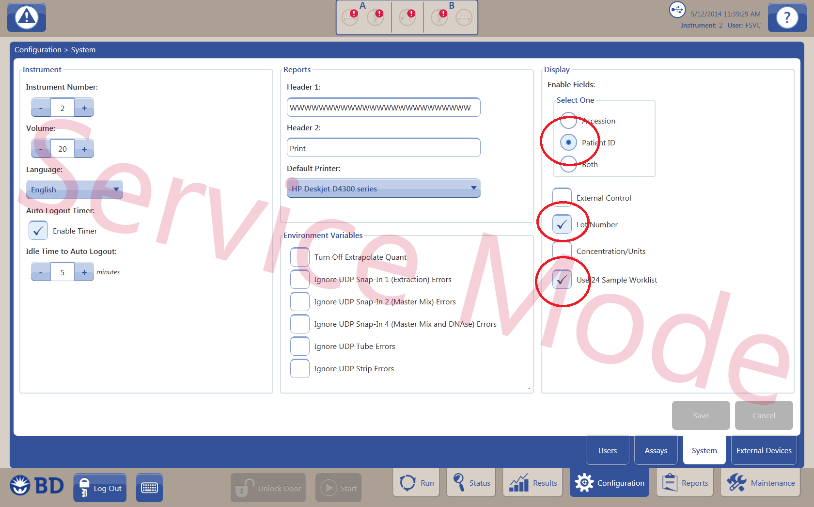
- Go to Configuration tab then System tab. Note the current settings for reference later. Select Patient ID, Use 24 Sample Worklist and Lot Number in the system configuration screen. Click Save.
- Click the Run tab, then Worklist.
- Select BD MAX QPM QUAL 63 under the Test column for all 24 lanes.
- Select the appropriate Kit Lot Number.
- Ensure all rows are auto populated. Any row that has an error from a previous run will not populate. To clear error: Click Maintenance, then System Error Summary and then Acknowledge Error.
- Load both A and B racks, and PCR cartridges into the instruments.
- Inspect all consumables (Cartridges and strips to ensure no bubbles, correct tips and the cartridges have clear and open lanes).
- Close the door and press Start. The QPM will take approximately 49 minutes to complete.
- After the QPM run is complete, click the Results tab, and open the run to observe if there are any Evaluates. If evaluates are present, refer to the 5-Channel Qualification Kit Result Review Table.
- Examine the cartridge. The reaction chambers in all lanes must be completely filled with no bubbles.
- complete Enteric Bacterial Panel (EBP) Qualification Run.
Enteric Bacterial Panel (EBP) Qualification Run:
- Click on Maintenance tab at bottom of screen.
- In the Environmental Variables tab, ensure uncheck Allow Incomplete Worklist.
- Click Save.
- Click the Run tab, then Worklist.
- Select BD MAX 5CH QUAL 63 under the Test column for all 24 lanes.
- Select the appropriate Kit Lot Number.
- Ensure all rows are auto populated. Any row that has an error from a previous run will not populate. To clear error: Click Maintenance, then System Error Summary and then Acknowledge Error.
- Scan the bar codes of the sample buffer tubes. Enter numbers 1 through 24 under the Patient ID column.
- Place two new PCR cartridges. Do not replace the consumables on the racks.
- Close the door and press Start.
- After the EBP run is complete, refer to Post System Run Review .